Keyword Match Type Tool
Paste a list of keywords and convert it to Broad, Phrase, Exact, and BMM (legacy) match types at once - clean, deduplicated, and ready to paste into Google Ads Editor.
How match types work
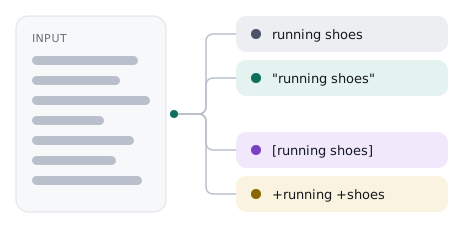
Google and Microsoft Ads use wrapper syntax to control how closely a search has to match your keyword before your ad is eligible to show: running shoes (Broad) can match loosely related searches, "running shoes" (Phrase) requires the phrase in order, and [running shoes] (Exact) requires a close match to the term itself.
Broad Match Modifier (+running +shoes) is labeled "legacy" here because Google folded BMM behavior into Phrase match in 2021 - it's included because exported legacy lists and Bing Ads conventions still use it.
Re-processing an already-formatted list is safe: existing wrapper characters are stripped before a new match type is applied, so you won't end up with ["running shoes"].
0 keywords
Match types
Options
Your formatted keywords will appear here
Paste a list and choose your match types - results update automatically (or press Ctrl/Cmd+Enter to process immediately).